Claude Code costs up to $200 a month. Goose does the same thing for free.
Claude Code vs Goose: A Deep-Dive Comparison for AI Coding Assistants The AI coding assistant space has moved far beyond autocomplete. We now have
Claude Code vs Goose: A Deep-Dive Comparison for AI Coding Assistants
The AI coding assistant space has moved far beyond autocomplete. We now have terminal-native agents that can read a repository, reason about a task, edit files, run tests, and explain their decisions. For developers, one of the most interesting comparisons today is Claude Code vs Goose. Claude Code is Anthropic’s premium, subscription-based coding assistant. Goose is an open-source, model-agnostic agent from Block. Both are powerful, but they sit at opposite ends of the pricing and flexibility spectrum.
In this deep dive, I’ll break down their architectures, pricing models, and real-world workflows. I’ll also show how pairing Goose with DeepSeek models through a service like MyDeepSeekAPI can challenge the assumption that premium coding assistants need a $200/month price tag.
Understanding Claude Code vs Goose: A High-Level Comparison
What Is Claude Code?
Claude Code is Anthropic’s command-line coding tool in the style of an agentic assistant. It connects directly to your repository, understands the project context, and can perform multi-step tasks like refactoring functions, resolving merge conflicts, or writing integration tests. It’s built on Anthropic’s Claude models, which means you get the same strong reasoning and long-context abilities that power Claude Opus and Sonnet.
According to the official Claude Code documentation, Claude Code is designed for “deep codebase understanding and agentic workflows.” That’s not marketing fluff. In practice, it means you can describe a bug, and Claude Code will trace the relevant code paths, propose a fix, and apply it. You can also let it run commands, rerun tests, and iterate until the problem is solved.
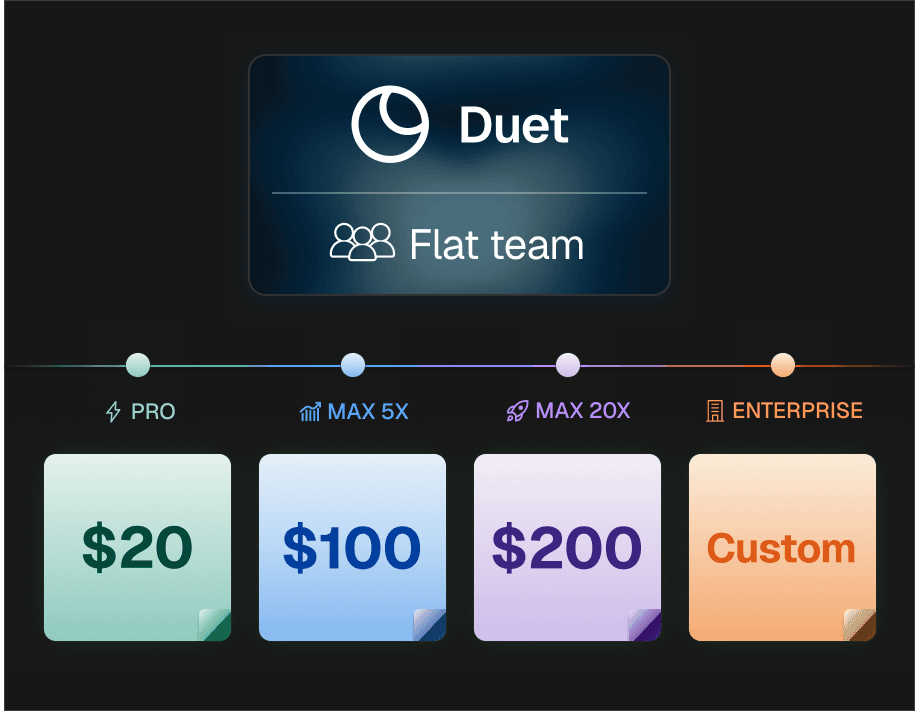
What makes Claude Code attractive is the low-configuration experience. You authenticate with Anthropic, set a few permissions, and you’re ready. But that simplicity comes with a premium price. Claude Code is part of Anthropic’s subscription tiers, and the top tier costs $200 per month. That’s expensive for an individual developer who might only use the tool for a few hours a week.
What Is Goose?
Goose is an open-source coding agent originally built by Block. It lives in the terminal and can run commands, edit files, and explore your repository. Unlike Claude Code, Goose is not tied to one model provider. You can use it with OpenAI-compatible endpoints, local models through Ollama, Anthropic, or DeepSeek. That makes it a favorite among developers who want to avoid provider lock-in.
You can find the Goose repository on GitHub and the official Goose documentation for installation and configuration. The software itself is free. There is no licensing fee and no mandatory subscription. The real cost is whatever you pay for the underlying model API. If you bring your own API key, you control the cost.
This is the key difference to understand. Claude Code is a product you subscribe to. Goose is an orchestration layer that connects to a model. That difference leads to radically different pricing and usage models.
How They Differ Under the Hood
Both tools are agentic and terminal-based, but they are not architecturally equivalent. Claude Code uses Anthropic’s proprietary models and is deeply integrated with their API and tool-use system. Goose is model-agnostic, meaning it sends your prompts to whatever OpenAI-compatible endpoint you configure. It doesn’t care if the model is Claude, GPT, DeepSeek, or a local Llama.
Here’s a quick comparison:
| Feature | Claude Code | Goose |
|---|---|---|
| Model access | Anthropic Claude only | Any OpenAI-compatible model, local models, DeepSeek, etc. |
| Cost model | Subscription from $20 to $200/month | Free software, pay per API token |
| Setup effort | Minimal, but requires an Anthropic account | Requires API key and base URL configuration |
| Extensibility | Limited to Anthropic’s official tooling | Open source, easy to customize and extend |
| Best for | Managed experience with premium support | Cost control and model flexibility |
The core tension comes down to upfront subscription cost vs. pay-as-you-go API usage. Claude Code bundles everything into a fixed monthly fee. Goose lets you pay only for what you consume, but you take on the responsibility of choosing and managing the model backend.
Claude Code vs Goose: Pricing Breakdown
Claude Code’s $200/Month Ceiling and What You Get
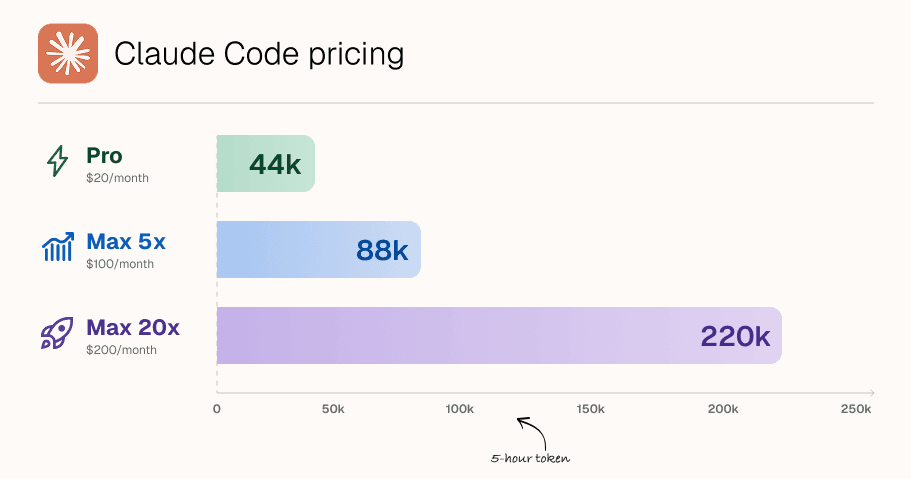
If you look at Anthropic’s pricing page, you’ll see Claude subscriptions range from the Pro tier at around $20 per month to the Max 2 tier at $200 per month. The more expensive tiers increase usage limits, give priority access during peak times, and unlock features for heavier workloads.
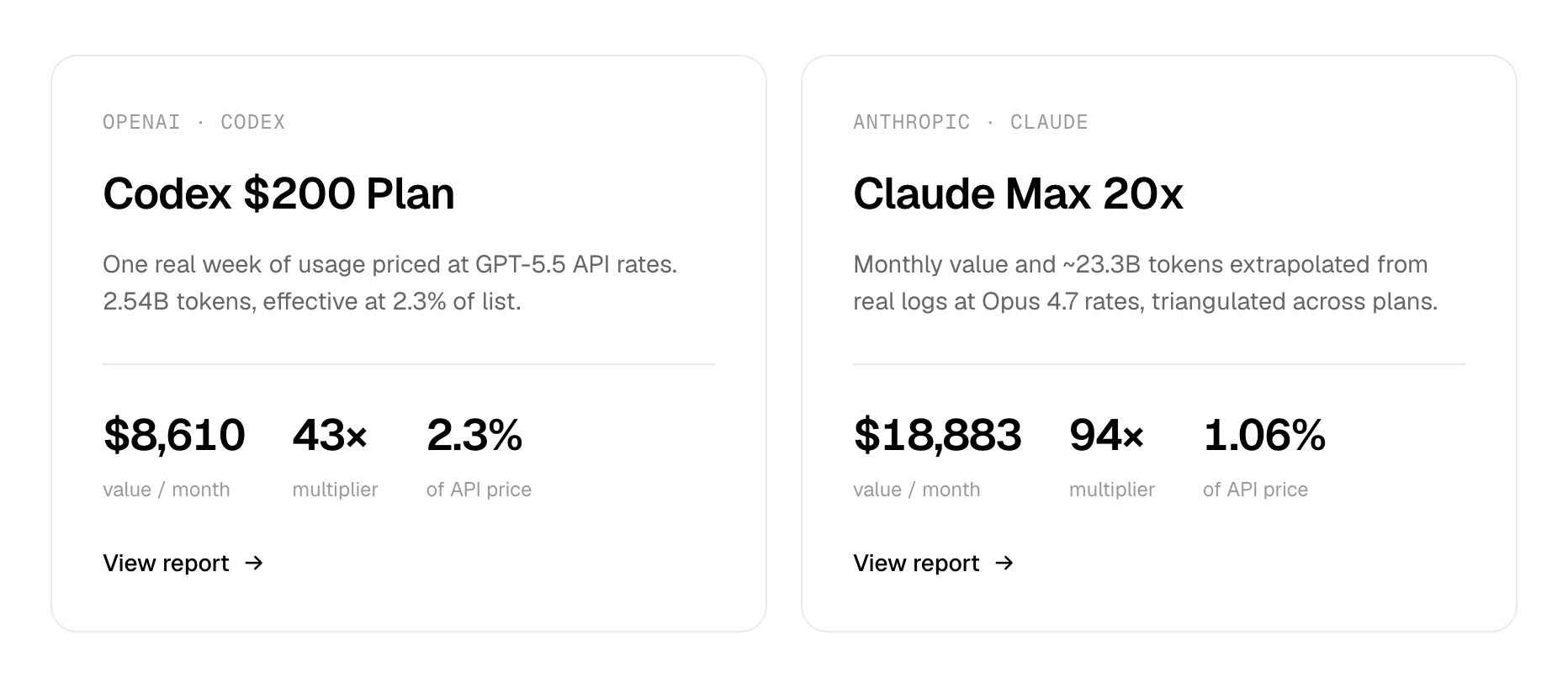
What does that money actually buy? In practice, the $200/month ceiling matters for developers who use Claude Code for hours every day. The higher tier allows for more requests and longer autonomous sessions. If you are doing a lot of large refactors, complex debugging, or long-running tasks, hitting the lower-tier limits is common.
However, many individuals and small teams never get close to those limits. A solo developer using Claude Code for occasional code review or test generation might be fine on the $20 tier. At the $200 tier, you’re paying for capacity you may not need. For teams, the math gets worse: ten seats at $200 each is $2,000 per month before you even think about CI and other tooling.
Goose’s Free Model and Its Limitations

Goose itself is free to download and run. But “free” is slightly misleading. You still need to supply an API key and pay for the underlying model usage if you’re using a hosted model. The advantage is that you can choose a cheap model provider.
If you use DeepSeek via a service like MyDeepSeekAPI, your per-request cost can be a fraction of what Anthropic charges. Light or moderate usage often costs just a few dollars a month. That is dramatically cheaper than a fixed $200/month subscription.
The hidden cost is setup time. Goose requires you to configure environment variables, base URLs, and model names. You also need to monitor token usage to avoid unexpected bills. This is not a dealbreaker for most developers, but it’s worth factoring into your decision.
Total Cost of Ownership: Subscription vs. Usage-Based Pricing
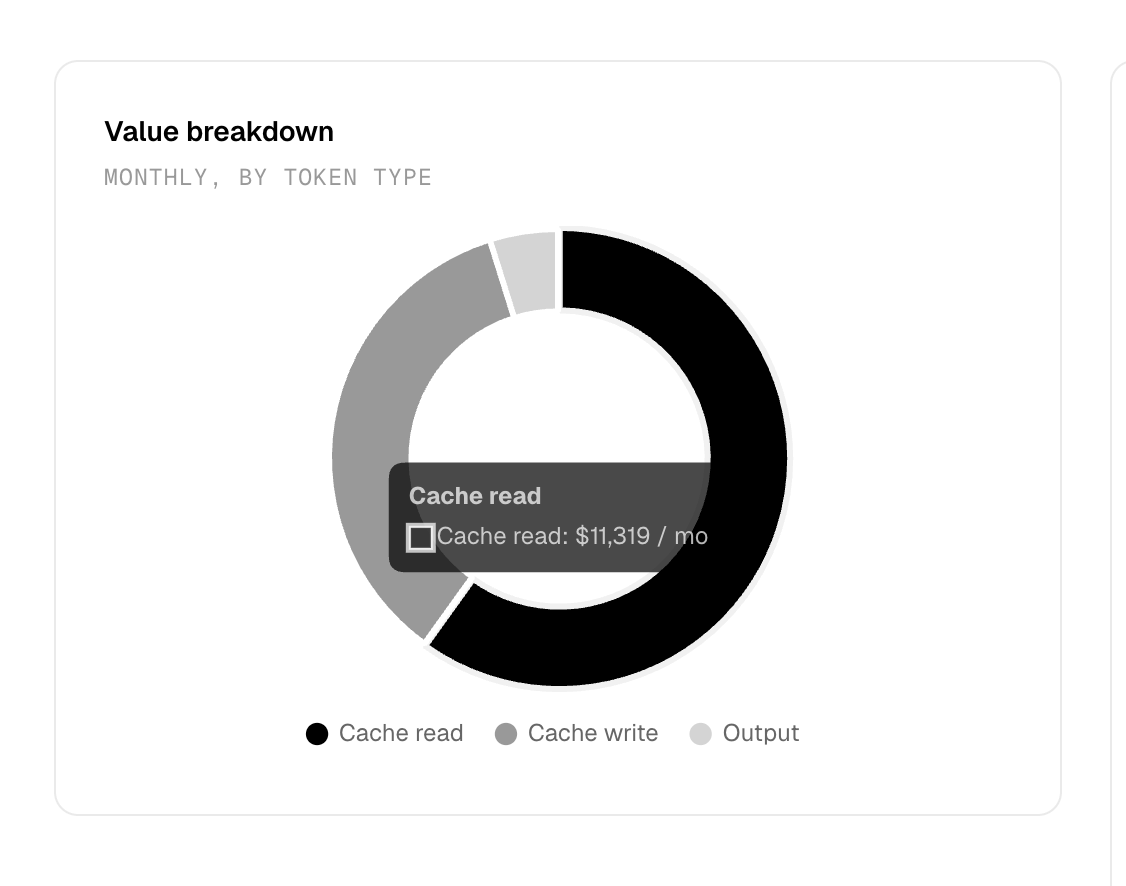
The real question isn’t whether Goose is free; it’s what the total cost of ownership looks like.
With Claude Code, you pay $200/month whether you use it for one hour or one hundred hours. With Goose, your monthly cost scales with your workload. A light week might cost $3. A heavy week might cost $30. But for most solos and small teams, the flexible API model ends up far cheaper.
This is where transparent-pricing alternatives like MyDeepSeekAPI become relevant. Instead of buying a premium subscription, you integrate Goose with a low-cost DeepSeek API and only pay for tokens. It’s a scalable approach that puts the developer back in control of spend.
AI Coding Assistant Pricing: Why Cost Models Matter
Per-Seat vs. Usage-Based Pricing
The per-seat subscription model is simple to understand but can get expensive fast. If you have a team of five developers, you’re paying five times the subscription price. And because Claude Code’s higher tiers give you more usage headroom, the pressure to upgrade seats increases as your team starts using the tool more heavily.
Usage-based pricing is more aligned with actual demand. You only pay when the model is working. If a developer is on vacation, that developer costs $0. If a developer spends all day generating tests, that day’s cost is higher. This can feel less predictable, but it’s often more honest about what you’re consuming.
For teams with variable workloads, usage-based pricing is usually the better choice. It avoids the sunk cost of paying for idle seats.
How to Estimate Your Monthly Spend
Here’s a simple mental model to estimate your AI coding assistant spend:
- Estimate the number of requests you make per day.
- Estimate the average tokens per request, including code context.
- Multiply by the token price for your chosen model.
- Multiply by working days per month.
For example, if you make 50 requests per day, each with 5,000 input tokens and 1,000 output tokens, and your API price is cheap, your monthly cost might stay in the tens of dollars range. If you’re using Claude Code’s fixed subscription, you’re paying $200 regardless of whether you make 5 requests a day or 200.
DeepSeek v3 and r1 models offered through MyDeepSeekAPI give you a low-cost entry point for this kind of calculation. You can run Goose for a week, check the actual token spend, and then decide whether a $200 subscription is really justified.
Why Transparent Pricing Beats Surprise Bills
Nothing destroys trust faster than a surprise bill. Some AI coding tools hide costs behind vague “usage limits” or make it hard to estimate how much a long session will cost. For developer tools, transparent pricing is essential.
MyDeepSeekAPI emphasizes transparent pricing and a “zero setup hassle” approach. You can sign up, generate an API key, and start making calls. No hidden setup costs, no complicated tier math. That kind of clarity matters when you’re trying to compare tools strictly on cost.
The Affordable AI API Advantage: Powering Assistants with DeepSeek
How DeepSeek v3 & r1 Fit Into Coding Workflows
DeepSeek has become a serious player in code generation. The two models you’ll most often see are:
- DeepSeek v3 for fast code generation and completion. It handles standard tasks like writing functions, adding comments, or creating boilerplate with low latency.
- DeepSeek r1 for complex reasoning and debugging. It excels at multi-step logical problems, tracing errors, and explaining why certain code fails.
When paired with an open-source coding agent like Goose, these models can handle most day-to-day coding tasks. The DeepSeek API documentation provides all the details needed to connect these models to existing tools.
In practice, using DeepSeek v3 for straightforward autocomplete-style tasks and switching to DeepSeek r1 for hard debugging gives you a sweet spot of speed and reasoning. You don’t need a $200/month subscription to access capable coding intelligence.
Mydeepseekapi: Affordable AI API with Transparent Pricing
MyDeepSeekAPI positions itself as an affordable AI API for DeepSeek models. Its value proposition is simple: integrate DeepSeek v3 and r1 with fast response times, transparent token pricing, and no complex infrastructure setup.
For developers who want to replace expensive subscriptions, this model is appealing. You generate an API key, point your coding agent at the API endpoint, and you’re done. The “zero setup hassle” promise is real in the sense that there are no SDKs to install and no special network requirements. It’s a standard OpenAI-compatible API.
The main benefit is scalability. You can start with a few dollars of usage and only increase your spend when you see value. That’s a much lower-risk way to adopt AI coding tools.
Comparing API Costs vs. Subscription Costs
Let’s do some side-by-side logic. Claude Code Max 2 costs $200 per month. That includes access to a premium model and a managed tool, but it’s a fixed cost.
With Goose + MyDeepSeekAPI, you pay for tokens. If your daily usage translates to $5 per month, you’re saving 97.5%. If you’re an extremely heavy user, you might still pay more than $200, but even then you could tune your prompts, use faster models, or batch tasks to reduce costs.
The truth is that most individuals and small teams will benefit from the flexible model. High-volume users may still hit parity with subscriptions, but for everyone else, the API-driven approach is the more rational financial decision.
DeepSeek Coding Models in Action: Real-World Implementation
Setting Up DeepSeek with Claude Code or Goose
One of the common questions I get is whether you can use DeepSeek with Claude Code. As of now, Claude Code is tightly coupled to Anthropic’s models. You cannot easily point Claude Code at a DeepSeek endpoint because the tool uses Claude-specific tool-calling features.
Goose, on the other hand, is built for this. Here is a minimal configuration example for using DeepSeek through an OpenAI-compatible provider.
First, set your environment variables:
export DEEPSEEK_API_KEY=your_api_key
export DEEPSEEK_BASE_URL=https://api.mydeepseekapi.com/v1
Then, configure Goose to use the DeepSeek provider. The configuration file may look something like this:
{
  "provider": "deepseek",
  "model": "deepseek-v3",
  "api_key_env_var": "DEEPSEEK_API_KEY",
  "base_url_env_var": "DEEPSEEK_BASE_URL"
}
After that, you can start Goose and ask it to analyze your repo, draft a refactor, or write tests. You can switch between DeepSeek v3 and r1 by changing the model name or using separate environment variables.
Performance Benchmarks and Response Times
When evaluating any coding model, responsiveness matters. A slow model can interrupt the flow of an interactive terminal session. What I focus on is not just benchmarks, but the experience of running real tasks: time-to-first-token, token generation speed, and the quality of the final edit.
MyDeepSeekAPI advertises “blazing-fast response times,” which is important for interactive use. If you’re going to use Goose as a daily driver, you want the model backend to keep up with your own reading speed. That’s one of the reasons API-based coding assistants are becoming popular: they can be fast and affordable at the same time.
That said, benchmarks are highly workload-dependent. A model that is great at generating boilerplate may struggle with a subtle concurrency bug. That’s why the recommendation is to test with your own code, not with generic benchmarks.
Lessons from Production: When to Choose Which
In production, I’ve seen the decision come down to two patterns.
First, mature organizations that need enterprise support and managed infrastructure often prefer Claude Code. The fixed subscription eliminates the need to monitor token spend. The support pipeline is well-defined. If a task must be completed and there is no time to troubleshoot API settings, Claude Code is the safer choice.
Second, startups and individual developers who care about cost control and model flexibility tend to choose Goose. Using Goose with DeepSeek through MyDeepSeekAPI gives them a powerful coding assistant without locking them into a per-seat subscription. They can experiment with different models, switch providers, and scale down when they take a break.
A common mistake is to assume that the expensive tool is automatically better. In my experience, a well-configured open-source agent with a good model often produces results that are just as good, especially for standard code generation and review tasks.
Industry Best Practices for Choosing an AI Coding Assistant
What the Experts Say About Open-Source vs. Commercial Tools
The open-source vs. commercial debate usually centers on transparency and control. Open-source tools like Goose give you the ability to inspect the code, fix bugs, and customize behavior. You are never dependent on a vendor’s roadmap. Commercial tools like Claude Code offer reliability, documentation, and a managed experience.
Many teams are now taking a hybrid approach: use an open-source frontend like Goose and plug in an affordable API backend like DeepSeek. This combines the best of both worlds: you get the flexibility of open source and the quality of a hosted model.
Security and Data Considerations
Code privacy is a critical concern. When you use a subscription-based tool, your code is sent to the vendor and subject to their data handling policies. When you use an open-source agent with your own API key, you still send code to the API provider, but you have more control over where that data goes.
If your organization has strict compliance requirements, you may want a commercial tool with enterprise-grade security audits. If you’re a solo developer, the flexibility to use a low-cost provider is probably worth the extra responsibility. Just make sure you understand the provider’s data retention policy before you send proprietary code.
Performance Benchmarks You Should Care About
The benchmarks that matter for coding assistants are not the same as generic LLM leaderboards. Focus on:
- Code accuracy: Does the generated code compile and pass tests?
- Context window size: Can the model hold your entire repository in context?
- Latency: How long does the assistant take to respond?
- Cost per task: How much does a typical refactor or debugging session cost?
When comparing Claude Code vs Goose, don’t get distracted by raw model scores. The best tool for you is the one that meets your performance needs within your budget.
Pros and Cons: Claude Code vs Goose at a Glance
When to Use Claude Code
Claude Code is the right choice if you are already invested in Anthropic’s ecosystem. If you use Claude models for other workflows and want a fully managed, low-configuration experience, Claude Code is hard to beat.
It is also a good choice if you have the budget and need enterprise support. Teams that need a single vendor to call when something breaks will appreciate the commercial backing. The subscription model also makes expense forecasting simple.
When to Use Goose (and When Not To)
Goose is ideal for developers who want free software, open-source flexibility, and model-agnostic workflows. If you like the idea of being able to switch between models without changing tools, Goose is the better choice.
However, Goose is not ideal if you need enterprise support, managed infrastructure, or do not want to manage API integrations yourself. The setup and monitoring burden is real. That said, using MyDeepSeekAPI with Goose reduces the operational friction. You get a clean OpenAI-compatible endpoint with transparent pricing, and you avoid the complexity of self-hosting a model.
Advanced Techniques: Customizing Your AI Assistant Workflow
Switching Models via Environment Variables
One major advantage of API-driven setups is the ability to switch models on the fly. With Goose, you can use environment variables to decide which model to use for a session.
For a standard coding session, set:
export GOOSE_MODEL=deepseek-v3
For a complex debugging session, switch to the reasoning model:
export GOOSE_MODEL=deepseek-r1
This can be done without reinstalling anything. It’s a level of flexibility that subscription-based tools simply don’t offer.
Creating a Cost-Effective Setup with Mydeepseekapi
To build a truly cost-effective workflow, combine Goose’s free orchestration layer with MyDeepSeekAPI’s affordable DeepSeek API. You get a powerful coding assistant for a fraction of the cost of a premium subscription.
The setup is simple: generate an API key, set the base URL, and start building. There are no hidden fees, no disk space requirements, and no mandatory usage tiers. You can also start with a strict monthly budget and monitor token usage to stay on track.
Automating Repetitive Tasks with Custom Prompts
Once you have Goose connected to DeepSeek, you can use custom prompts to automate repetitive tasks. For example, you can ask for a security-focused code review, generate unit tests for a module, or draft documentation for a new function.
A simple prompt might be:
Review this function for edge cases and suggest a fix. Focus on memory safety and concurrency issues.
Because DeepSeek v3 and r1 are excellent at code reasoning, these tasks are handled efficiently and at low cost. In this way, you can build a personalized AI coding assistant without paying for enterprise pricing.
Making the Switch: Migration Guide from Claude Code to Goose
Step-by-Step Migration Checklist
If you’re thinking about making the switch, here is a practical migration checklist:
- Audit your current usage. Identify the Claude Code features you actually use. Are they essential, or are they nice-to-haves?
- Set up Goose. Install it from the GitHub repository and configure it for your shell.
- Configure DeepSeek via MyDeepSeekAPI. Set the API key and base URL, then verify the connection with a simple prompt.
- Migrate critical workflows. Refactor your most common prompts and commands into Goose-compatible formats.
- Test on non-critical projects first. Choose a small side project or a low-risk internal tool to validate the workflow.
Common Pitfalls to Avoid
There are a few mistakes almost everyone makes during migration.
First, underestimating API costs without monitoring. Even with a cheap model, a runaway prompt that sends the entire repository multiple times can drive up costs. Use token logging early.
Second, assuming all Claude Code features have direct equivalents in Goose. Goose is powerful, but it is not a clone. Some built-in commands and permissions behave differently. Budget time for learning the new tool.
Third, ignoring model-specific differences in output style and reasoning. DeepSeek r1 has a different “personality” than Claude. It may be more verbose or more eager to explain. Adjust your prompts accordingly.
Testing Your New Workflow Before Full Commitment
The safest way to migrate is to run both tools in parallel for one sprint. Pick a set of tasks, run them through Claude Code and through Goose + DeepSeek, and compare the results.
Measure the cost per task, the quality of the resulting code, and developer satisfaction. Don’t just look at the output. Consider the effort required to correct mistakes and the speed of iteration. After one sprint, you’ll have enough data to make an informed decision.
Final Thoughts
The debate between Claude Code and Goose is not about which tool is “better.” It’s about what kind of developer experience you want. Claude Code offers a premium, managed, subscription-based workflow. Goose gives you an open-source, model-agnostic foundation that can run on cheap, transparent API services like MyDeepSeekAPI.
For many developers, the combination of Goose and DeepSeek is the sweet spot. You get a capable coding assistant, full control over your models, and a cost structure that matches your actual usage. At the end of the day, Claude Code vs Goose is really a choice between paying for convenience and investing in flexibility.