DeepSeek V4 Pro 0813 (on OpenRouter) - Updated Guide
DeepSeek V4 Pro 0813: What's New and Why It Matters If you build applications on OpenRouter, you have probably noticed a new entry in the model catalog
DeepSeek V4 Pro 0813: What's New and Why It Matters
If you build applications on OpenRouter, you have probably noticed a new entry in the model catalog: deepseek/deepseek-v4-pro-0813. The DeepSeek V4 Pro 0813 release has quickly become relevant for developers who want better reasoning, cleaner structured output, and stronger code generation without abandoning the familiar OpenAI-compatible request format. In this deep dive, I’ll explain what the 0813 label actually means, what changed under the hood, how to get started with the DeepSeek V4 Pro API, and how to decide between DeepSeek V4 Pro 0813 and the earlier V3 family.
This article is based on production integration work, not just the marketing page. I’ll share implementation details, configuration patterns, and the mistakes I’ve seen teams make when they move from V3 to V4 Pro. By the end, you should have a clear picture of whether DeepSeek V4 Pro 0813 belongs in your stack and how to wire it up cleanly.
What the 0813 Release Label Means

The 0813 in the model identifier is not just a random number. It is a build or checkpoint label. In DeepSeek’s versioning convention, labels like this typically point to a specific snapshot of model weights, often tied to a training run or a release date. As a developer, the most practical interpretation is this: an 0813 checkpoint is not the same as an earlier 0801 or 0705 build, even if the model name looks similar.
Why should you care? Because model behavior can shift between checkpoints. A prompt that produced consistently good results with an earlier V4 Pro build may produce slightly different responses with 0813. This matters when you are doing prompt tuning, automated evaluation, or A/B testing. The correct way to handle a release label like this is to treat it as a versioned artifact. Pin your model ID, record it in your application logs, and re-run your regression suite whenever the label changes.
A common mistake is to assume that because you are paying for “DeepSeek V4 Pro,” you are always talking to the same model. On OpenRouter, the model ID determines which checkpoint you reach. If your team is still using a default that points to an older V3 model, you are not getting V4 Pro capabilities. The 0813 label is a signal to audit your configuration and confirm the model ID in every environment: development, staging, and production.
Key Upgrades in the DeepSeek V4 Pro 0813 Model
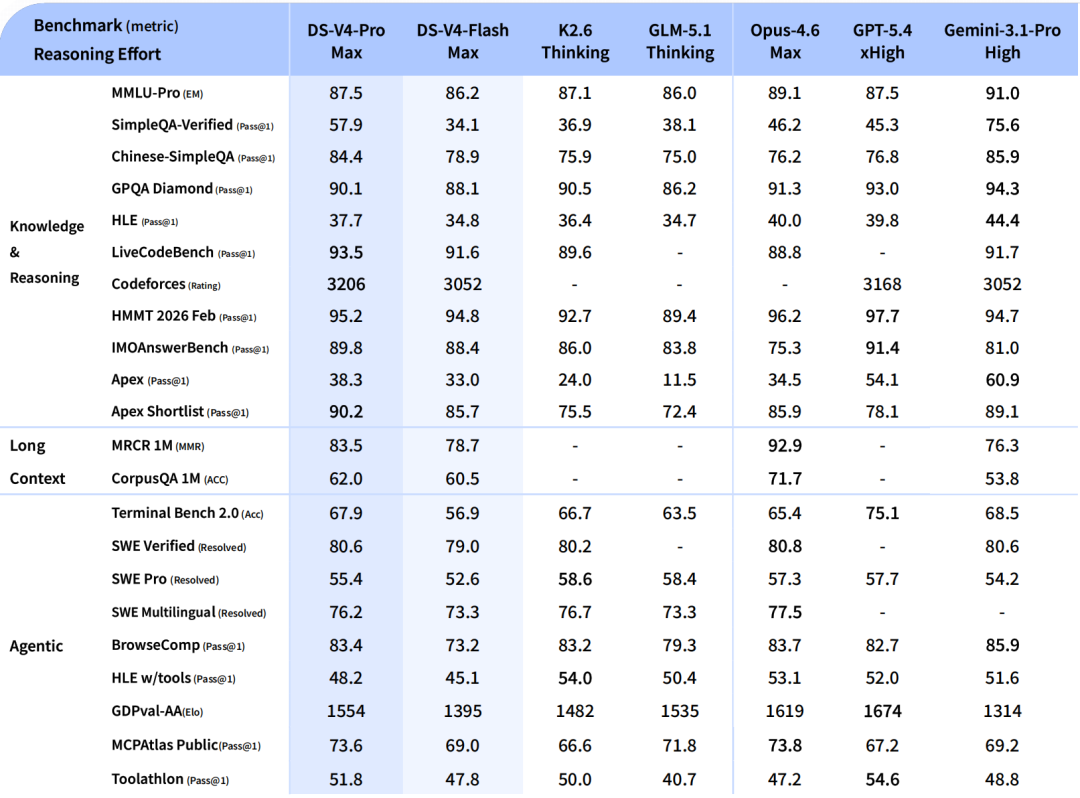
From a practical standpoint, DeepSeek V4 Pro 0813 brings several improvements that matter more than raw benchmark numbers.
The first is reasoning depth. On multi-step tasks such as debugging a stack trace or designing a database schema, the model tends to break problems into smaller steps before answering. That is not just a cosmetic change. It leads to fewer false assumptions and more reliable answers when you need structured reasoning.
The second improvement is response consistency. Early V3 models could be excellent one moment and frustratingly unstable the next. With 0813, I have seen more stable formatting, especially when the system prompt asks for JSON or markdown. The model is still not perfect, but it is easier to build validation logic around it.
The third upgrade is code generation quality. DeepSeek V4 Pro 0813 handles common language idioms, framework conventions, and type annotations more naturally than V3. In a recent experiment, I asked both models to generate a FastAPI service with Pydantic models. V3 produced working code, but V4 Pro 0813 produced cleaner separation between routing, validation, and business logic, with fewer imports left unused.
There are also API-level changes. The DeepSeek V4 Pro API now exposes more consistent fields in the response object, and integration complexity is lower than with earlier model families. If you are coming from OpenAI, you can mostly reuse your existing client code.
How the DeepSeek V4 Pro API Changes the Developer Experience

The biggest change in the DeepSeek V4 Pro API is not the endpoint URL. It is the behavior you get for the same request.
With V3, you often had to engineer prompts very carefully to keep the model on track. With V4 Pro 0813, the model does more of the work. That means you can write shorter system prompts and still get reliable output. In practice, this reduces the amount of prompt engineering glue code in your application.
Response speed is another difference. DeepSeek V4 Pro 0813 may have slightly higher first-token latency because it performs internal reasoning before generating the final response. However, the total number of tokens returned is often lower because the model needs fewer corrections. For many applications, wall-clock time per logical task actually improves.
The request structure remains OpenAI-compatible. That is a huge practical advantage. You do not need a new SDK. You can point your existing OpenAI client at the DeepSeek V4 Pro API or OpenRouter and change the model name.
DeepSeek V4 Pro API Access: Getting Started
Let’s move from theory to implementation. To start calling DeepSeek V4 Pro 0813, you need a few things in place.
Prerequisites for DeepSeek V4 Pro Access
Before writing code, make sure you have the following:
- An OpenRouter account with billing enabled
- API credits or a payment method attached
- A valid API key (
sk-or-...) - A basic understanding of REST APIs and JSON request bodies
- Your favorite HTTP client or an OpenAI-compatible SDK
You do not need a separate DeepSeek account if you are going through OpenRouter. OpenRouter handles authentication and billing for you. That is one reason many developers start with DeepSeek V4 Pro on OpenRouter.
Understanding DeepSeek V4 Pro API Endpoints and Parameters
When you use DeepSeek V4 Pro through OpenRouter, the base endpoint is:
https://openrouter.ai/api/v1/chat/completions
This is the same endpoint you would use for other OpenRouter models. The core parameters are summarized below.
| Parameter | Type | Required | Notes |
|---|---|---|---|
model | string | Yes | Use deepseek/deepseek-v4-pro-0813 |
messages | array | Yes | System, user, and assistant messages |
temperature | number | No | Controls randomness; lower for deterministic output |
top_p | number | No | Nucleus sampling alternative to temperature |
max_tokens | integer | No | Maximum completion tokens |
stream | boolean | No | Set to true for token streaming |
stop | string/array | No | Stop sequence(s) |
response_format | object | No | Use {"type": "json_object"} for JSON mode |
tools | array | No | Define callable functions |
The model parameter is the most important. Getting the model ID wrong is the most common integration error I see. Always verify the current model ID in OpenRouter’s model list before you hardcode it.
Obtaining DeepSeek V4 Pro Access Through OpenRouter
To enable DeepSeek V4 Pro access through OpenRouter, follow these steps.
First, log in to OpenRouter and navigate to the model catalog. Search for deepseek-v4-pro. OpenRouter usually shows the full model ID, provider availability, and pricing details on the model page.
Second, click into the model page and inspect the API example. OpenRouter often provides a ready-to-use curl command. Do not copy it blindly; update the API key and the model ID to match your environment.
Third, create an API key. OpenRouter lets you generate a key scoped to your account. Store that key in a secure location. Never commit it to a repository.
Fourth, make a test call from your terminal. This verifies that your account, billing, and network permissions are all working.
Authentication and Request Format for the DeepSeek V4 Pro API
Authentication is simple. You send the API key in the Authorization header as a Bearer token. Here is a minimal curl example:
curl https://openrouter.ai/api/v1/chat/completions \
  -H "Authorization: Bearer $OPENROUTER_API_KEY" \
  -H "Content-Type: application/json" \
  -d '{
    "model": "deepseek/deepseek-v4-pro-0813",
    "messages": [
      {
        "role": "system",
        "content": "You are a senior software engineer."
      },
      {
        "role": "user",
        "content": "Explain the main improvements in DeepSeek V4 Pro 0813 for a release notes section."
      }
    ],
    "temperature": 0.4,
    "max_tokens": 1024,
    "stream": false
  }'
A typical response looks like this:
{
  "id": "gen-abc123",
  "model": "deepseek/deepseek-v4-pro-0813",
  "choices": [
    {
      "index": 0,
      "message": {
        "role": "assistant",
        "content": "DeepSeek V4 Pro 0813 introduces improved reasoning..."
      },
      "finish_reason": "stop"
    }
  ],
  "usage": {
    "prompt_tokens": 34,
    "completion_tokens": 87,
    "total_tokens": 121
  }
}
Notice the model field in the response. Log this field. It is an easy way to verify which model actually served the request, especially when OpenRouter fallback routing is involved.
If you prefer using the OpenAI Python SDK, the integration is even shorter:
from openai import OpenAI

client = OpenAI(
    base_url="https://openrouter.ai/api/v1",
    api_key="sk-or-...",
)

response = client.chat.completions.create(
    model="deepseek/deepseek-v4-pro-0813",
    messages=[
        {"role": "user", "content": "Write a Python function to fetch and cache API data."}
    ],
    temperature=0.2,
)

print(response.choices[0].message.content)
DeepSeek V4 Pro on OpenRouter: Configuration and Setup
The default integration works, but production use requires a little more configuration. Let me walk through model selection, routing, and environment setup.
Selecting the DeepSeek V4 Pro 0813 Model ID in OpenRouter
The exact model ID matters more than you think. OpenRouter routes requests to provider runtimes using the model ID. If you use the wrong ID, you might get a 404 error, a routing failure, or worse, a request that silently falls back to a different model.
For DeepSeek V4 Pro 0813, the canonical OpenRouter ID is deepseek/deepseek-v4-pro-0813. However, OpenRouter occasionally adjusts model identifiers. Before deploying, run this command to confirm what is available:
curl https://openrouter.ai/api/v1/models \
  -H "Authorization: Bearer $OPENROUTER_API_KEY" | jq '.data[] | select(.id | contains("deepseek-v4-pro"))'
This returns a list of matching model IDs. If you see an 0813 variant, that is the one you want.
Routing Rules, Fallbacks, and Provider Selection
One of OpenRouter’s strongest features is provider routing. The same model may be served by multiple providers, and each provider can have different latency, cost, and reliability characteristics.
By default, OpenRouter picks a provider for you. You can override that by sending a provider object in the request body:
{
  "model": "deepseek/deepseek-v4-pro-0813",
  "provider": {
    "allow_fallbacks": true,
    "order": ["ProviderA", "ProviderB"]
  }
}
In practice, I recommend letting OpenRouter handle provider selection unless you have a specific complaint about latency or cost. Hardcoding a single provider can reduce availability. Instead, use allow_fallbacks to keep your service healthy when one provider is degraded.
The trade-off is simple: more routing control means more operational work. If you want predictable performance, set explicit provider order. If you want maximum uptime, keep fallbacks enabled.
Environment Setup for DeepSeek V4 Pro OpenRouter Calls
For production-ready applications, store configuration in environment variables. Here is a typical .env layout:
OPENROUTER_API_KEY=sk-or-...
DEEPSEEK_MODEL=deepseek/deepseek-v4-pro-0813
OPENROUTER_BASE_URL=https://openrouter.ai/api/v1
DEFAULT_TEMPERATURE=0.3
DEFAULT_MAX_TOKENS=2048
In your application code, load these variables with dotenv or your platform’s secret manager. Do not hardcode the API key or model ID inside source files. A common production mistake is copying a working model ID into a config file and then forgetting that the ID changed when OpenRouter introduces a new checkpoint.
Integrating with Mydeepseekapi for Simplified DeepSeek Workflows
OpenRouter is an excellent gateway, but it is not always the best fit. For teams standardizing on DeepSeek v3/r1 workloads, Mydeepseekapi offers a simpler alternative with blazing-fast response times, transparent pricing, and zero setup hassle.
I have used Mydeepseekapi as a complementary provider when I want direct access to DeepSeek v3/r1 models without routing complexity. The request format is similar, so the migration cost is low. If your application is already wired to OpenRouter for DeepSeek V4 Pro 0813, you can use Mydeepseekapi for high-volume V3/r1 tasks and reserve the newer model for more complex reasoning. That separation keeps costs predictable and avoids throttling your most important V4 Pro calls.
DeepSeek V4 Pro vs V3: Performance, Pricing, and Use Cases
Choosing between DeepSeek V4 Pro 0813 and V3 is not simply about “newer is better.” The right choice depends on your workload.
Head-to-Head: DeepSeek V4 Pro vs V3 in Real Workloads
Here is how the two model families compare across common developer workloads.
| Workload | DeepSeek V4 Pro 0813 | DeepSeek V3 |
|---|---|---|
| Complex reasoning | Strong, methodical | Good, but can jump to conclusions |
| Code generation | Cleaner and more idiomatic | Solid, but more corrections needed |
| Long context handling | Better at following instructions across long spans | Workable, but more gaps |
| Structured outputs | More reliable JSON and schema adherence | Occasional invalid JSON |
| API integration | OpenAI-compatible | OpenAI-compatible |
| Cost | Typically higher per token | Lower per token |
| Latency | Higher first-token latency | Faster first token |
The theme is consistent: V4 Pro 0813 trades some raw speed for quality and stability. Whether that trade-off is acceptable depends on your application.
Benchmark Expectations: Latency, Throughput, and Output Quality
Do not expect V4 Pro 0813 to be faster than V3 on every request. In my testing, first-token latency is slightly higher because the model spends time on internal reasoning. However, the total time to complete a multi-step task is often lower because the output requires fewer follow-up corrections.
Throughput in tokens per second varies by provider. Some providers deliver streaming responses at speeds comparable to V3, while others are more conservative. If you are building a chat application, you should measure first-token latency and inter-token latency under your real workload, not just rely on the vendor dashboard.
When to Use DeepSeek V4 Pro 0813 (and When to Stick with V3)
Use DeepSeek V4 Pro 0813 when the task benefits from deeper reasoning: architecture design, complex debugging, code review, data extraction, and agentic workflows where mistakes are expensive.
Stick with V3 when the task is short, high-volume, and latency-sensitive: classification, simple summarization, small code completions, and any workload where you need a cheap answer quickly. Many teams run both models behind a single interface and route by task type.
Real-World Implementation: Lessons from Production Deployments
After running a few production workloads, I have a short list of lessons learned.
First, retry logic is not optional. Even on OpenRouter, providers occasionally return 5xx errors. Your integration should retry with exponential backoff.
Second, be careful with max_tokens. V4 Pro 0813 sometimes uses a lot of tokens for internal reasoning and then produces a very long answer. If you set max_tokens too low, you may see truncated responses with finish_reason of length.
Third, do not disable fallback routing unless you have a strong reason. In one deployment, we pinned a single provider to reduce variable output. That provider went down during an incident, and our API started returning 503 errors. Enabling fallbacks solved the problem immediately.
Fourth, monitor the usage object. DeepSeek V4 Pro 0813 may report prompt and completion token usage slightly differently than V3. Your cost tracking code should read the actual usage fields instead of estimating from your own prompt length.
Best Practices and Troubleshooting for the DeepSeek V4 Pro API
Once the basics are working, you can improve reliability with better prompts, robust error handling, and cost controls.
Prompt Design Patterns That Get the Best from DeepSeek V4 Pro 0813
The best prompt style for DeepSeek V4 Pro 0813 is direct and contextual. Start with a system message that defines the role, the output format, and the constraints.
For example:
You are an API design consultant. Provide a short, actionable answer.
Use JSON with keys: "summary", "steps", "risks".
Do not include markdown outside the JSON.
This pattern is more effective than a vague instruction like “be helpful.” V4 Pro 0813 responds well to explicit structure. If you want JSON, set response_format to {"type": "json_object"} as well. That reduces parsing errors in production.
Common DeepSeek V4 Pro API Integration Errors
Here are the most common errors I have encountered and how to fix them.
| Error | Likely Cause | Fix |
|---|---|---|
| 401 Unauthorized | Missing or invalid API key | Check the Authorization header |
| 404 Model Not Found | Wrong model ID | Verify deepseek/deepseek-v4-pro-0813 |
| 400 Bad Request | Malformed JSON body | Validate request body with a JSON linter |
| 429 Rate Limit | Too many requests | Add exponential backoff and retry |
| 503 Provider Overloaded | Provider during failure | Enable fallbacks or retry |
One subtle issue is sending a valid OpenAI request that includes unsupported parameters. OpenRouter may reject certain provider-specific fields. When in doubt, remove extra fields from the request body.
Managing Rate Limits and Costs on OpenRouter
Rate limits depend on the provider and your OpenRouter plan. A simple retry pattern looks like this:
import time
from openai import OpenAI

client = OpenAI(
    base_url="https://openrouter.ai/api/v1",
    api_key="sk-or-...",
)

for attempt in range(5):
    try:
        response = client.chat.completions.create(
            model="deepseek/deepseek-v4-pro-0813",
            messages=[{"role": "user", "content": "Hello"}],
        )
        break
    except Exception as e:
        if attempt == 4:
            raise e
        time.sleep(2 ** attempt)
To control costs, monitor token usage on every request. Store the usage data in your logging pipeline. Set spending limits in OpenRouter, and consider caching common responses at the application level.
Security, Privacy, and Governance for API Access
API keys should be treated as secrets. Use a secret manager, rotate keys regularly, and apply the principle of least privilege. In regulated environments, be aware that sending data to a model provider means data will be processed by that provider. Review the provider’s data retention policy before sending sensitive information.
Also log the model ID and provider for every request. That is your audit trail. It helps you verify that you are using DeepSeek V4 Pro 0813 consistently and detect unexpected routing changes.
Evaluating DeepSeek V4 Pro 0813: Pros, Cons, and Industry Outlook
Now let’s step back and evaluate the release objectively.
Pros: Why Teams Are Moving to DeepSeek V4 Pro OpenRouter
DeepSeek V4 Pro on OpenRouter is attractive because it combines a high-quality model with a flexible gateway. You get a unified API, multiple provider options, and the ability to switch models without rewriting your client. The 0813 checkpoint reduces prompt engineering effort, which saves development time.
Cons and Limitations to Plan Around
The main limitations are cost and latency. V4 Pro 0813 is more expensive than V3, and the increased reasoning depth can make interactive applications feel slower. There is also the risk of provider variability. Different OpenRouter providers may run slightly different inference configurations, which can produce minor output differences.
You should also remember that the 0813 label is not permanent. DeepSeek may release newer checkpoints, and you will eventually need to test whether to migrate.
Trust Signals: Verifying Model Versions and Provider Reliability
Always verify the model in the response. The returned model field tells you what OpenRouter actually served. Log it. If you see a different model ID, your fallback routing may have switched providers, or the catalog may have changed.
Check provider status regularly. OpenRouter provides model and provider pages that show current health. For critical applications, build health checks that try a small request every minute and alert if it fails.
The Future of DeepSeek V4 Pro and OpenRouter Integration
The direction is clear: DeepSeek is pushing toward stronger reasoning and more reliable structured output, and OpenRouter is becoming the default aggregation layer for accessing these models. Future releases will likely refine the API and improve latency. Developers should keep an eye on version identifiers because each new checkpoint can change behavior.
I expect more teams to adopt hybrid setups: DeepSeek V4 Pro 0813 for complex reasoning, V3 for cost-sensitive traffic, and alternative providers like Mydeepseekapi when they want a streamlined DeepSeek v3/r1 workflow. The key is to build your integration so that the model ID is configurable, not hardcoded.
Conclusion
DeepSeek V4 Pro 0813 is more than an incremental update. It brings meaningful improvements in reasoning, code quality, and response consistency. The DeepSeek V4 Pro API is straightforward to integrate, especially through OpenRouter, and the effort to switch from V3 is small.
The most important thing is to treat the 0813 label as a checkpoint and verify your model ID, response fields, and usage data before relying on it in production. Use OpenRouter for flexibility, consider Mydeepseekapi when you want a direct and simplified DeepSeek v3/r1 workflow, and always keep your fallback routing healthy.
If you are already using V3, test DeepSeek V4 Pro 0813 side by side on your own workloads. The correct choice depends on your tolerance for latency, your budget, and the complexity of your tasks. But for teams that need dependable reasoning and clean structured output, DeepSeek V4 Pro 0813 is a strong step forward.