DeepSeek V4 Pro 0813 (on OpenRouter)
DeepSeek V4 Pro API: What the 0813 Release Means for Developers The DeepSeek V4 Pro API has quickly become one of the most compelling options for
DeepSeek V4 Pro API: What the 0813 Release Means for Developers
The DeepSeek V4 Pro API has quickly become one of the most compelling options for developers who want strong reasoning and coding capabilities without the cost ceilings of proprietary frontier models. The 0813 iteration, now available through OpenRouter, refines that proposition with meaningful improvements in consistency, tool use, and production readiness. In this deep dive, we'll break down what changed, why OpenRouter availability matters, how to integrate the model, what to expect from DeepSeek V4 Pro pricing, and whether migrating from DeepSeek V3 is worth the effort.
What Changed in the 0813 Release

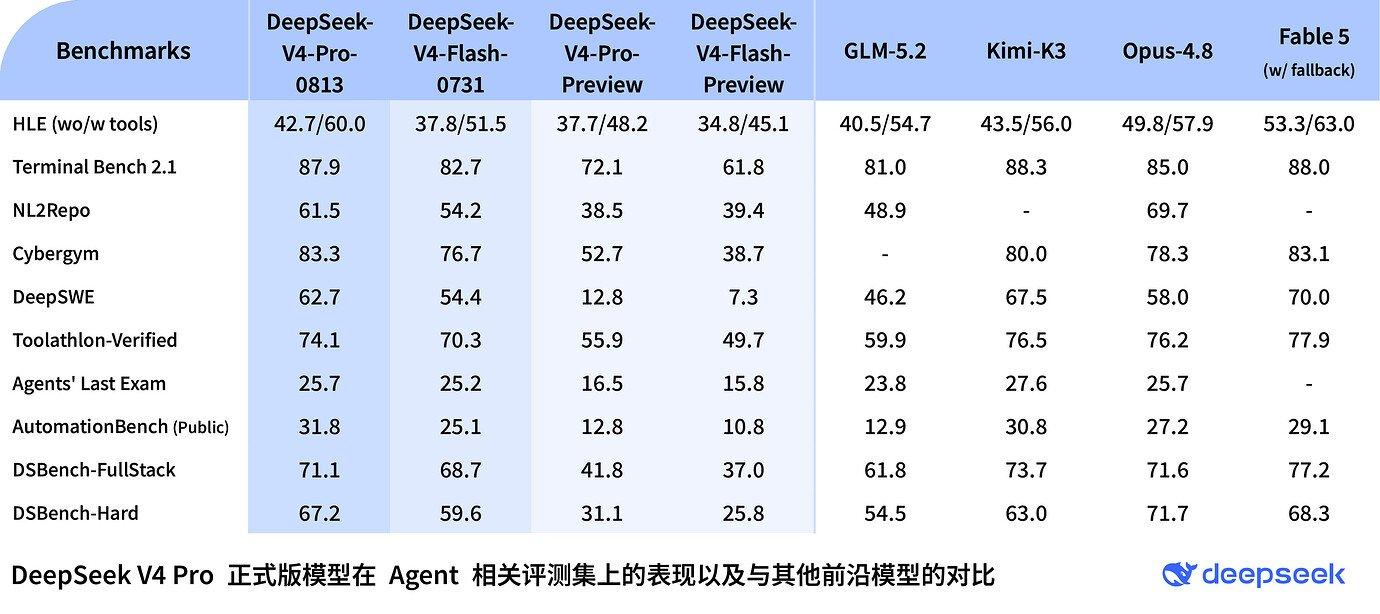
The 0813 release lands as the latest checkpoint in DeepSeek's V4 Pro line. Where earlier V4 versions focused on establishing a new architecture baseline, the 0813 build emphasizes execution quality: longer multi-step reasoning, more reliable instruction following, and tighter integration with function-calling workflows. The "0813" suffix follows DeepSeek's date-based version convention, so the tag tells you exactly when this iteration was cut.
The most significant distribution news is the model's availability on OpenRouter. Developers can now call DeepSeek V4 Pro without signing up for a separate DeepSeek account, using the same API key and endpoint they already use for other models. This also positions DeepSeek V4 Pro as a default option in a growing number of AI coding assistants, agent frameworks, and evaluation harnesses.
Who should care? Teams building cost-sensitive AI features — code review tools, RAG pipelines, multilingual support systems — that previously had to choose between open-weight models and expensive proprietary APIs. The 0813 update makes that trade-off noticeably more attractive.
Why OpenRouter Availability Matters for Developers

OpenRouter's value proposition is simple: one API endpoint, one billing relationship, and instant access to dozens of models. For a team evaluating DeepSeek V4 Pro 0813, that removes almost all integration friction. You don't need to provision infrastructure, manage a second vendor, or negotiate a contract just to run a proof of concept.
This matters more than it seems. In practice, the barrier to trying a new model is rarely the model itself — it's the operational overhead around it. OpenRouter collapses that overhead into a single API call. If the model underperforms on your specific task, you switch to another model profile using the same request structure. If it exceeds expectations, you scale without re-architecting.
The listing also signals ecosystem maturity. OpenRouter typically surfaces models that have sufficient demand and production stability to justify hosting. For DeepSeek, that's an endorsement of the V4 Pro line's reliability, not just its benchmark scores. For developers who want an even faster path to DeepSeek models, Mydeepseekapi offers zero-setup integration and blazing-fast response times, without the routing layer in between.
DeepSeek V4 Pro API: Key Features and Technical Capabilities
Endpoints, Payload Formats, and Model Versions
The DeepSeek V4 Pro API follows the OpenAI-compatible chat completions convention, which means most teams can integrate it with existing SDKs. The two things you need to get right are the base URL and the model string. On OpenRouter, the base URL is https://openrouter.ai/api/v1, and the model identifier follows the deepseek/deepseek-v4-pro-0813 pattern — though you should always confirm the exact slug against OpenRouter's model listing, since aliases change.
from openai import OpenAI
import os

client = OpenAI(
    base_url="https://openrouter.ai/api/v1",
    api_key=os.environ["OPENROUTER_API_KEY"],
)

response = client.chat.completions.create(
    model="deepseek/deepseek-v4-pro-0813",
    messages=[
        {"role": "system", "content": "You are a senior backend engineer."},
        {"role": "user", "content": "Explain the trade-offs of Redis vs Postgres for a job queue."},
    ],
    temperature=0.3,
    max_tokens=2048,
)
Beyond the standard parameters, the API supports system prompts, top_p, frequency_penalty, and presence_penalty. Context window options vary by endpoint, and the 0813 build is widely reported to handle long multi-turn sessions more gracefully than earlier versions — less instruction drift, better referential accuracy across turns.
Rate Limits and Latency: DeepSeek V4 Pro API Performance
Production teams care about three numbers: requests per minute, tokens per minute, and p95 latency. The DeepSeek V4 Pro API's rate limits will vary depending on whether you're calling OpenRouter, the native DeepSeek endpoint, or a dedicated provider. What you should plan for is bursty consumption patterns — agent loops and batch jobs typically need to handle 429 responses with exponential backoff.
Latency is where V4 Pro 0813 shows its personality. Short chat interactions return quickly on dedicated infrastructure, but complex reasoning tasks can take noticeably longer because the model generates more internal "thinking" tokens. For coding and math workloads, budget two to four times the latency of a simple completion call. This is a deliberate trade-off: slower token flow, but significantly fewer failed attempts on hard problems. Mydeepseekapi is built to deliver fast response times for DeepSeek workloads, reducing the need for heavy performance tuning on your side.
Tool Calling, Structured Output, and Advanced Parameters
The 0813 release's most practical upgrade is tool-calling consistency. Earlier DeepSeek iterations occasionally returned malformed function arguments; the new build is measurably more reliable at emitting valid JSON for tool calls. That matters for any agentic workflow where a malformed response crashes an execution loop.
{
  "tools": [
    {
      "type": "function",
      "function": {
        "name": "get_weather",
        "description": "Fetch current weather for a city",
        "parameters": {
          "type": "object",
          "properties": {
            "city": {"type": "string"}
          },
          "required": ["city"]
        }
      }
    }
  ],
  "tool_choice": "auto"
}
You also get JSON mode for structured output, which pairs well with validation layers like Pydantic or Zod. The key insight is to use structured output early in your pipeline — asking the model to emit a typed schema on the first pass is cheaper and more reliable than generating free text and parsing it later.
DeepSeek V4 Pro API Security and Key Management
Whenever you integrate a new model API, security hygiene should come before feature work. Store your API keys in environment variables or a proper secret manager — never in client-side code or committed config files. On OpenRouter, you can issue scoped keys and rotate them without disrupting your deployment.
Data governance also deserves attention. Before scaling, confirm what the provider does with your prompts and completions: whether they're used for training, how long logs are retained, and which regions handle inference. If your organization operates in a regulated industry, write these answers down and get them reviewed. The DeepSeek V4 Pro API is a model you call, not a private deployment; treat it accordingly.
DeepSeek V4 Pro OpenRouter: Setup and Integration Guide
Choosing the Right Model Profile on OpenRouter
OpenRouter's interface lists DeepSeek V4 Pro 0813 alongside other DeepSeek variants. When selecting the model profile, verify three things: the exact version tag (make sure it says 0813, not an older checkpoint), the provider options listed for that model, and the current per-token pricing. OpenRouter sometimes exposes multiple providers behind a single model slug; you can pin a specific provider for consistency.
The high-level setup flow is straightforward: create an OpenRouter account, generate an API key, select the DeepSeek V4 Pro model in your client configuration, and send your first request. If you've integrated OpenAI before, you're five minutes away from DeepSeek V4 Pro OpenRouter access.
Authentication, Environment Variables, and Fallbacks
Authentication is a single bearer token. Set it as OPENROUTER_API_KEY in your environment and reference it from your application's config layer.
A common mistake is hardcoding the model string in multiple places, then forgetting to update it when a new checkpoint ships. Centralize model identifiers in a single config value so you can switch from V3 to V4 Pro 0813 — or roll back — with one change.
For production, design fallbacks before you need them. If DeepSeek V4 Pro starts returning 429s, you want automatic failover to a secondary model or provider. Log the fallback events so you can track whether your primary model is becoming unreliable. Add alerting on error rate and p95 latency; these are the signals that tell you when a model profile has degraded.
OpenRouter vs Mydeepseekapi: Choosing the Right Access Layer
| Consideration | OpenRouter | Mydeepseekapi |
|---|---|---|
| Access model | Multi-model gateway | Dedicated DeepSeek path |
| Setup complexity | Requires key + model routing | Zero-setup integration |
| Billing | Consolidated across providers | Direct, predictable |
| Optimization | Generic routing | DeepSeek-specific performance |
| Support | Provider-agnostic | Specialized DeepSeek assistance |
OpenRouter wins on flexibility: one key for dozens of models. But that flexibility comes with routing and key-management overhead, plus latency variability depending on the upstream provider. Mydeepseekapi removes that overhead, giving teams a dedicated, zero-setup path to DeepSeek models with optimized response times. Choose the gateway when you're actively comparing models; choose a dedicated layer when you've committed to DeepSeek and want consistent production behavior.
DeepSeek V4 Pro Pricing: Costs, Limits, and ROI
Per-Token Cost Breakdown: Input, Output, and Context
DeepSeek V4 Pro pricing, like the rest of the DeepSeek family, is token-based. You pay separately for input tokens, output tokens, and in some configurations, cached context tokens. The 0813 build is expected to follow DeepSeek's historical pattern: aggressive per-token rates compared to proprietary frontier models, with a premium over V3.
To estimate cost per request, use a simple formula:
(input_tokens × input_price) + (output_tokens × output_price) = cost per request
A conversational exchange of 2,000 input tokens and 500 output tokens is a fraction of a cent at DeepSeek's typical rates. But long-document RAG queries — where you stuff 30,000 tokens of context — change the math quickly. Always check the official DeepSeek pricing table for current rates, since per-token prices shift with release cycles.
DeepSeek V4 Pro Pricing vs V3 and Other Frontier Models
DeepSeek V4 Pro pricing sits above V3 but remains dramatically cheaper than most proprietary frontier models on a per-token basis. That price-performance ratio is the main reason teams migrate. Lower cost per token means you can afford longer reasoning chains, more retries, and larger context windows — all of which improve output quality.
That said, cheaper isn't automatically better. V3 is still sufficient for high-volume, low-complexity tasks like classification, summarization, and extraction. Reserve V4 Pro for workloads where reasoning depth actually changes the outcome: complex code generation, multi-step planning, and ambiguous customer queries. The right answer is often "use both," with V3 handling the trivial 80% and V4 Pro handling the hard 20%.
How to Estimate Your Monthly DeepSeek V4 Pro Bill
Here's a practical budgeting scenario. Suppose you run an AI coding assistant that processes 5,000 requests per day. Each request averages 3,000 input tokens and 800 output tokens. Multiply by 30 days, and you'll get your monthly consumption. At DeepSeek's typical pricing, that's a manageable recurring cost — but a few variables can spike it.
Watch three cost multipliers: long context windows (a 50,000-token prompt costs far more than a 5,000-token prompt), high max_tokens settings that let the model ramble, and retry loops where an error triggers the same expensive request twice. Set hard caps on context size and output length, and you'll keep the bill predictable. Mydeepseekapi emphasizes transparent pricing, making it easier to predict and control spend on DeepSeek workloads.
DeepSeek V4 vs V3: Upgrade Strategy and Benchmarks
DeepSeek V4 vs V3: Performance Benchmarks and Real-World Tests
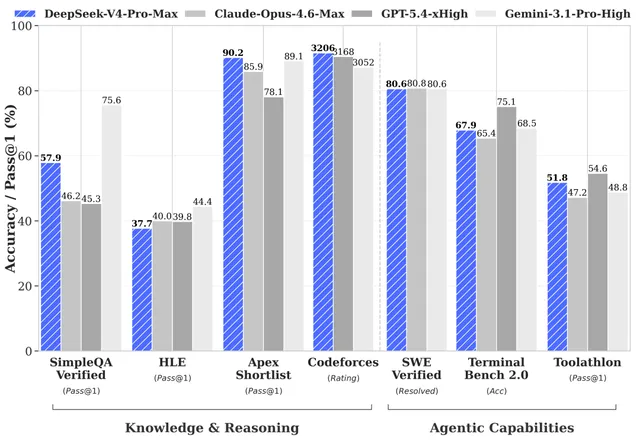
The DeepSeek V4 vs V3 comparison comes down to reasoning depth. Early developer observations point to clear improvements in multi-step math, coding, and instruction following — the areas where V3 sometimes lost coherence after several turns. Community reports from AI coding assistants describe fewer hallucinations in generated code and better adherence to repository-specific conventions.
The comparison is balanced, though. On simple extraction and classification tasks, most teams see little meaningful difference between V4 Pro 0813 and V3. Latency is higher on V4 Pro, and the token cost is higher too. If your workload doesn't require multi-step reasoning, V4 Pro 0813's advantages won't show up in your metrics.
Migration Considerations: Moving From V3 to V4 Pro
Moving from V3 to V4 Pro is not a find-and-replace operation. Before you cut over, run a migration checklist: update prompt templates that were tuned for V3's quirks, re-test tool calls and JSON mode, validate output formats against your parsers, and review rate limits.
There's no evidence of a hard deprecation of V3; the two models coexist. But behavior changes between versions can silently break your application — especially if you relied on V3's particular formatting habits. The safest path is a side-by-side evaluation: send the same production prompts to both models, compare outputs against your own quality rubric, and only switch the traffic split when V4 Pro wins consistently.
Hidden Insight: What the 0813 Version Number Reveals
The "0813" suffix is a date-coordinated version label, and it reveals something important about DeepSeek's release cadence. The team ships meaningful improvements on a weeks-long cycle, not a quarterly one. That's a double-edged sword for developers. On one hand, you get rapid access to fixes and capability gains. On the other, you can't assume the model you deployed is the model that exists today.
Version-number intelligence matters because silent model changes are a real production risk. If a new checkpoint ships under a stable alias, your outputs can drift without any code change on your side. The fix is to pin your model version explicitly, track release notes, and re-evaluate your model choice every few weeks rather than every few quarters.
Real-World Implementation: Experience and Lessons Learned
Early Tests and Community Feedback
Patterns from early testing are remarkably consistent across developer communities. DeepSeek V4 Pro 0813 shines in AI coding assistants — particularly for code review, refactoring, and test generation — and in RAG pipelines where it handles long, messy contexts with better focus than V3. Document summarization and multilingual work also get strong marks.
Where users report struggle: very long generations sometimes lose structural consistency, and the model's default tone can be verbose. Developers are learning to tighten system prompts and set explicit output constraints. The pleasant surprise is how few malformed JSON responses appear in tool-calling workflows compared with earlier builds.
Common Pitfalls When Deploying DeepSeek V4 Pro
The most common integration issues we see are mundane: using an outdated model version string, treating 429 rate-limit responses as fatal errors, and assuming prompt formats carry over unchanged from V3.
Troubleshooting each is straightforward. Verify the model slug against the docs. Implement exponential backoff with jitter for rate limits. And always validate structured outputs — never trust a model to emit perfect JSON, regardless of version. Defensive coding patterns like retries, fallbacks, and schema validation aren't optional; they're the difference between a demo and a production system.
Production Optimization Tips for High-Quality Outputs
Optimization starts with temperature. For coding and reasoning tasks, keep it between 0.1 and 0.4; higher values introduce creative variance you don't want in production. Use detailed system prompts to establish output structure, and ask for JSON or markdown explicitly when that's what you need.
A useful pattern is chaining DeepSeek V4 Pro with a cheaper model: let V3 handle pre-processing and classification, then send only the hard cases to V4 Pro. You get frontier-quality reasoning on a fraction of your traffic, which keeps cost and latency in check without sacrificing final output quality.
Under the Hood: Advanced DeepSeek V4 Pro Techniques
Architecture and Reasoning Capabilities
DeepSeek hasn't published architecture details for the 0813 build, and speculation should be treated as just that. What the available signals suggest: deeper reasoning chains before final answers, improved context utilization across long multi-turn conversations, and more consistent instruction adherence in edge cases.
For developers, the practical implication is that you can shift complex reasoning onto the model's internal planning rather than engineering elaborate few-shot chains. Simpler prompts often outperform complex ones on V4 Pro 0813 because the model does more pre-thinking. Try removing one prompt layer and see whether output quality actually improves.
Advanced Use Cases: Agents, Tool Calling, and Structured Output
The combination of tool calling and structured output unlocks agentic workflows. A router agent can classify incoming requests and dispatch them to specialized tools; an executor loop can run the same task with multiple strategies and pick the best result; a validation layer can catch malformed outputs before they reach users.
An implementation pattern that works well: define a strict schema for the agent's final response, use tool_choice: "auto" so the model can decide whether to call tools, and wrap the loop in a supervisor that enforces a maximum iteration count. This gives you reliability without hand-coding every branch.
Trust and Reliability: Is DeepSeek V4 Pro Ready for Production?
Reliability, Security, and Data Handling
Before any production commitment, verify four things: uptime history, provider SLAs, data handling policies, and compliance certifications relevant to your industry. OpenRouter publishes provider status, and DeepSeek's documentation outlines data usage terms — but you should ask specific questions: Is your data used for training? Where are requests routed geographically? What logs are retained and for how long?
For enterprises and regulated industries, document these answers and include them in your vendor risk review. A model's quality is irrelevant if its data handling fails your compliance bar.
When To Use DeepSeek V4 Pro (and When Not To)
Use DeepSeek V4 Pro 0813 when cost efficiency matters, when your tasks involve real reasoning, and when you value open-ecosystem flexibility. It's an excellent fit for coding assistance, multilingual workloads, structured output pipelines, and cost-sensitive AI features.
Don't use it when you need enterprise-grade support contracts, when your workloads are so simple that V3 handles them perfectly, or when a proprietary model's specific capabilities (like certain multimodal or safety features) are non-negotiable. Be honest about the trade-offs; not every workload needs the latest checkpoint.
Industry Best Practices and Authoritative Signals
The authoritative sources to watch are DeepSeek's official release notes, the OpenRouter model listing, and the DeepSeek API documentation. These channels publish version changes, pricing updates, and deprecation notices. Set up a routine check — every couple of weeks — to review what changed, whether your pinned model version is still current, and whether a newer checkpoint justifies re-evaluation.
The Mydeepseekapi Advantage for DeepSeek Workloads
Zero-Setup Integration and Dedicated Access
If the exploration phase is over and you're ready to commit to DeepSeek, Mydeepseekapi is built specifically for teams running DeepSeek workloads in production. It strips away the routing layer, the key juggling, and the multi-provider guesswork. You get a dedicated path to DeepSeek models with optimized response times and minimal configuration.
Predictable Performance and Pricing at Scale
The final piece is operational sanity. Transparent pricing, clear rate limits, and a provider that specializes in DeepSeek infrastructure mean fewer surprises when you scale. The DeepSeek V4 Pro API is a strong choice for cost-aware teams — and pairing it with Mydeepseekapi makes the implementation as smooth as the model's reasoning. Give the 0813 build a serious evaluation; for most production workloads, it earns its place in your stack.