DeepSeek V3 API: Complete Integration Guide
Step-by-step guide for developers to connect and use DeepSeek V3 API efficiently. Unlock advanced AI capabilities today.
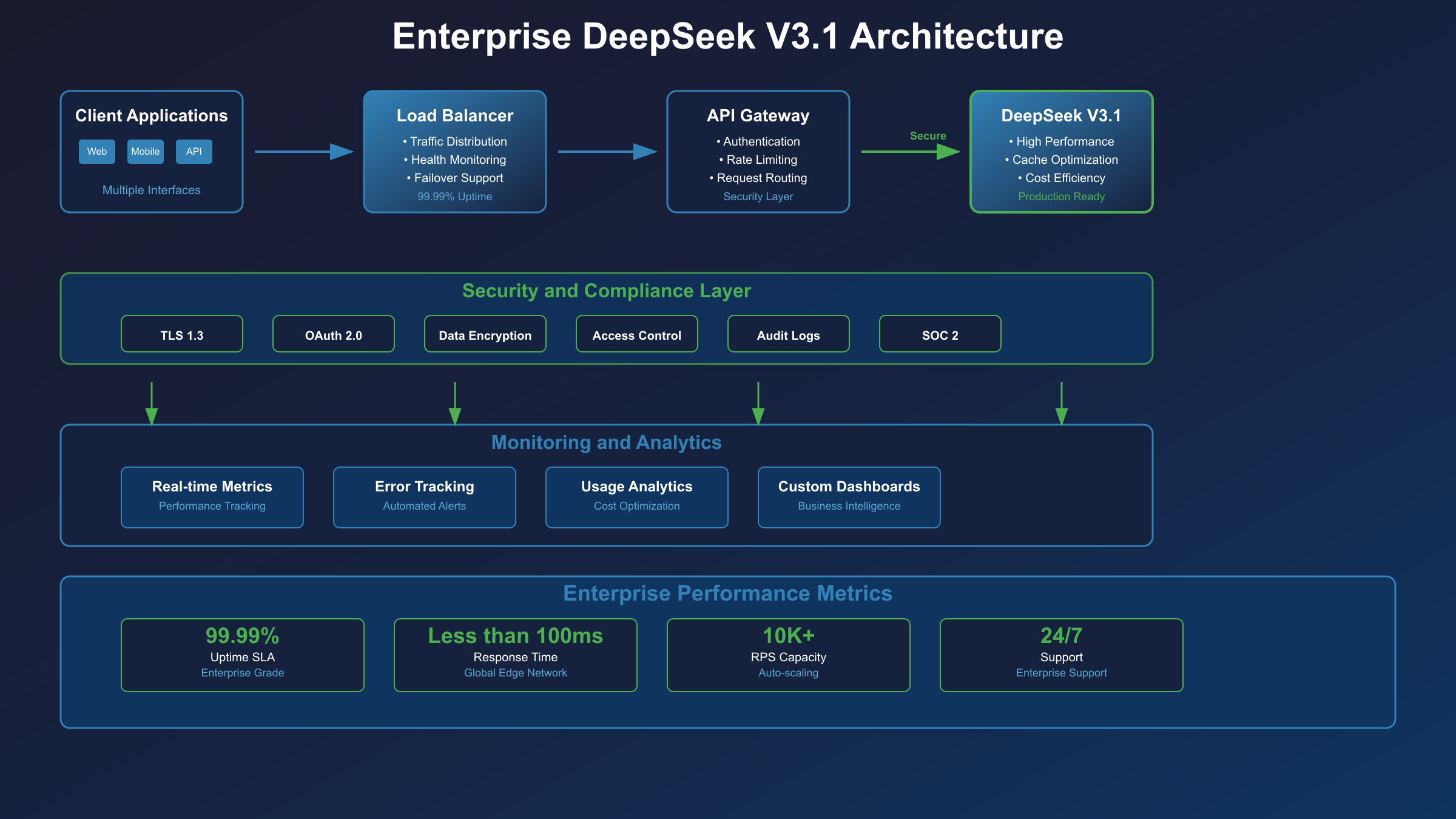
1. Quick-start Checklist
1.1 Prerequisites (Python ≥3.8, Node ≥18, 4 GB RAM, active API key)
Before you type a single request, make sure your machine is ready. DeepSeek V3 was trained on an MoE (Mixture-of-Experts) topology that keeps memory pressure low on the client side, but you still need a reasonable footprint. Python 3.8+ or Node.js 18 LTS guarantees that the async runtimes and TLS stacks support HTTP/2 and modern ciphers. You can install newer Python versions in seconds with PyEnv instead of fighting system packages. If you are on Ubuntu, grab the latest LTS server image and you will be compliant out of the box with plenty of tooling pre-packaged. A 4 GB RAM baseline is recommended so you can keep several virtual environments active without swapping.
1.2 Obtain & store your V3 API key securely
Security starts at the front door. Log in to the DeepSeek Console, create a new key, and copy it immediately into your secrets manager. Never paste keys into Slack or commit them to Git; one leaked key can cost thousands in surprise bills. If you do not have Vault available, spin up an AWS Secrets Manager entry and lock the IAM policy down to the deployment role. Need a quick reference on patterns? The OWASP secrets management cheat-sheet is a concise checklist of do's and don'ts. Treat keys like production credentials, because they are.
With prerequisites done you can test connectivity in under a minute.
1.3 60-second Hello-World request (cURL & Python)
DeepSeek's official quick-start provides an elegant single-liner:
curl https://api.deepseek.com/v1/chat/completions \
  -H "Authorization: Bearer $DS_KEY" \
  -H "Content-Type: application/json" \
  -d '{"model":"deepseek-chat","messages":[{"role":"user","content":"hello?"}]}'
If you prefer staying in Python, requests is more than enough:
import os, requests, json
url = "https://api.deepseek.com/v1/chat/completions"
headers = {"Authorization": f"Bearer {os.getenv('DS_KEY')}"}
data = {"model": "deepseek-chat",
        "messages": [{"role": "user", "content": "hello?"}]}
print(requests.post(url, headers=headers, json=data).json())
Both samples hit the same endpoint and should return a friendly greeting within a second. No SDK required—perfect for CI checks, health dashboards or one-off scripts.
2. Understanding DeepSeek V3 Architecture
2.1 Model portfolio: MoE, reasoning, embedding
DeepSeek V3 is not a monolith; it is a portfolio. The Chat MoE handles conversational turns, a separate reasoning distillation produces chains-of-thought for mathematical logic, and the embedding variant generates 1536-d vectors for semantic search. All three share a backbone pre-trained on two trillion text tokens, but they diverge in the final layers and fine-tuning objectives. For up-to-date parameter counts and context windows, browse the evergreen model catalogue. Academics can read the ArXiV paper explaining how sparse MoE layers trade compute for latency without hurting perplexity. And if you want to run similar MoE topologies yourself, HuggingFace has a friendly Mixture-of-Experts explainer with code snippets.
2.2 Endpoint map & routing strategy (US-East vs APAC)
DeepSeek lives in two clouds right now: AWS US-East-1 and an APAC region in Alibaba Cloud Singapore. Traffic is steered automatically based on the caller's latency probe, but you can hard-pin an endpoint if your security team is picky. Want a zero-infrastructure mirror? Attach an AWS Global Accelerator to the provided Anycast IPs and you will receive health-check fail-over for free. Should problems arise, bookmark the DeepSeek status page and its CloudWatch widgets. Global load balancers can be layered on top with a Cloudflare load-balancer rule if you are outside AWS; both are compliant with DeepSeek's TLS termination.
2.3 Pricing curve: input vs output tokens, function-calling surcharge
Pricing follows a simple linear formula: prompt tokens times input rate plus completion tokens times output rate. A small surcharge applies to each function call because the server must spin an auxiliary container to execute user-defined snippets. Rates are denominated in credits that you pre-purchase in the console; current tiers are visible on the pricing page. You can predict token counts with the public OpenAI token calculator or by piping your prompt through DeepSeek's /tokenize helper. Once workloads scale, export logs to AWS Cost Explorer tags so FinOps can attribute spend to each product line.
3. Authentication Patterns
3.1 Bearer header vs query param (security best-practice)
DeepSeek accepts two modes: Authorization: Bearer <key> header or ?key=<key> query string. The header is the only acceptable practice outside throwaway demos. Browsers cache query strings in the address bar, corporate proxies log them, and CDNs often write the entire target URL to disk. Need evidence? See RFC 6750 and the latest OWASP API security risks. The docs at DeepSeek's authentication guide provide copy-paste snippets that always default to the header.
3.2 Key rotation automation with GitHub Actions
Rotating keys is painful when done manually. GitHub Actions can handle it on a schedule. Here's the gist: a nightly cron job calls the DeepSeek rotate-key API, receives a new key, stores it in Vault using the HashiCorp Vault GitHub action, then redeploys the application via the same workflow. The previous key remains valid for a five-minute grace window, preventing outages. If you do not want Vault, swap it out for AWS Secrets Manager or Azure Key Vault; the API interaction code stays identical. The template workflow lives inside the GitHub Actions docs so you can fork it in minutes.
3.3 Troubleshooting 401/403 errors with rate-limit headers
401 surfaces when the key is missing, malformed, or disabled. 403 surfaces when scope or spend quota is exhausted. DeepSeek returns standard Retry-After and X-RateLimit-Remaining headers; use them in your retry logic. MDN's HTTP status reference explains the semantic difference, while the official DeepSeek error index lists custom codes. For distributed teams that need observability, capture those headers in OpenTelemetry and correlate them with the RFC 6585 Ratelimit standard.
4. SDK & Community Libraries
4.1 official deepseek-python, deepseek-js
The company maintains two first-party SDKs: deepseek-python and deepseek-js. Both are auto-generated from an OpenAPI spec, which means new endpoints appear at most 24 h after release. They expose async client classes, automatic retries, and optional streaming wrappers. In Python you can stick to the comfy synchronous call or go asyncio for massive concurrency; the same decision matrix exists for Node. And yes, you can pip-install from PyPI or npm from the official channel, so no private registry credentials needed.
4.2 Community wrappers: Go, Rust, C#
If your stack demands native binaries, community projects fill the gap: go-deepseek, deepseek-rs, and DeepSeek.Net enjoy active maintenance. They follow idiomatic conventions; for example the Rust wrapper returns Result<AsyncStream, Error> so you can process Server-Sent Events with futures::stream. Each project links back to DeepSeek's OpenAPI schema in its README, which simplifies regenerating a new client whenever routes change.
4.3 Async vs streaming interface
Streaming keeps latency low when you need an answer now. Python asyncio plays nicely with aiohttp, letting you maintain thousands of concurrent sockets on a single CPU core. On Node, the built-in stream API surfaces back-pressure, so memory stays bounded when a prompt produces verbose answers. DeepSeek supports SSE for streaming chats, documented here. SDKs handle reconnection automatically, but your retry policy should follow Tenacity or Polly best practices for deterministic backoffs.
5. Core Endpoints Deep Dive
5.1 /chat/completions – messages, temperature, top-p
The workhorse endpoint is /chat/completions. Pass an array of messages that alternates between user, assistant, and system roles. Two important knobs are temperature and top_p. Temperature controls entropy (0.2 gives focused factual answers, 1.2 gets creative). Top-p performs nucleus sampling, culling the worst tokens once probability mass exceeds the threshold. Combine temperature 0.8 with top-p 0.95 and you will get lively but reasonably safe outputs. The parameter semantics mirror OpenAI's spec, so if you have ever used GPT-4, you already know the vocabulary.
5.2 /completions – prompt, stop, log-probs
Need raw text auto-regression? Use /completions. This endpoint ignores chat roles and simply extends the supplied prompt. It accepts stop sequences, helpful for stopping JSON generation at the first closing brace, and returns logprobs that expose per-token likelihoods. Many researchers use the logprobs for active-learning loops or calibration studies; you can read the original GPT-2 paper for background. Stanford also hosts a concise slide deck on sampling algorithms if you want to implement custom decoders on the client side.
5.3 /embeddings – dimensions, batching, similarity search
Vector search enthusiasts appreciate the embeddings endpoint. It outputs 1536-d float vectors normalized to unit length and supports batching up to 512 texts in a single POST. You can store the vectors in FAISS, Weaviate, or any database with an HNSW index. For hybrid retrieval, combine neural similarity with BM25 by following the SBERT best-practices guide which shows fusion scoring formulas that outperform either method alone.
5.4 /fine-tune – dataset format, LoRA, checkpoints
Custom models start life at /fine-tune. Supply a JSONL file of prompt-response pairs (or instruction-input-output triplets) and DeepSeek spins a LoRA adapter on top of the base MoE network. The endpoint exposes granular flags such as learning rate, batch size, and lora_rank. Once training completes you receive a checkpoint id that you may reference in /chat/completions like {"model":"ckpt-abcde123"}. You pay only compute time; storage charges apply after 30 days of dormancy, so remember to clean up. For experimentation, import the checkpoint into a HuggingFace TRL LoRA script and continue fine-tuning on a free Colab GPU.
6. Function-calling & Tools
6.1 Declarative schema, parallel calls
DeepSeek adopted OpenAI's function-calling spec, meaning you describe callable functions in JSON Schema and the model may request a parallel execution. This allows you to inject real-time information (stock tickers, weather, private ERP data) without bloating the prompt. Declare tools at the top level, then set tool_choice: "auto" to let the model decide. If deterministic behaviour matters, force a specific function or restrict tool usage entirely. The exact JSON Schema reference is available at json-schema.org and the DeepSeek cookbooks showcase several patterns.
6.2 Built-in plugins: web-search, calculator, SQL
Beyond user-defined functions, DeepSeek hosts several first-party plugins. Enable web_search and the backend calls SerpAPI to fetch latest info. The calculator plugin delegates expressions to the battle-tested mathjs library. SQL plugin spins a transient SQLite in WebAssembly so you can run read-only joins without provisioning databases. Each plugin consumes extra tokens, but the alternative is writing custom Python and managing libraries. Pick your trade-off.
6.3 Streaming callbacks vs polling results
Function invocations can outlast HTTP timeouts. DeepSeek provides two patterns: you can stream results over SSE or poll a results endpoint. Streaming is usually cleaner—register a callback URL in your request body and the service transmits updates as JSON patches. The browser-based dashboard uses this mechanism. For legacy firewalls that block SSE, fallback polling is also available; results remain accessible for 24 h.
7. Production Reliability
7.1 Retry & exponential-backoff strategies
Reliability engineers know that retries are useless without jittered exponential backoffs. DeepSeek's servers return Retry-After in seconds; obey it or you will be throttled harder. Tenacity (Python) and Resilience4j (Java) offer one-line wrappers, but you may also implement the algorithm yourself. Refer to the Google SRE book for math that guarantees convergent load.
7.2 Circuit breaker pattern with Hystrix/Resilience4j
Retries are not enough when the whole region is down. Circuit breakers stop cascading failures by failing fast once error ratio exceeds a threshold. Configure a half-open probe every 30 seconds and allow one test request; if it succeeds, close the circuit. Modern stacks such as Resilience4j expose metrics via Micrometer, letting you alarm on state transitions. The Microsoft pattern page remains a great visual primer even if you are not on Azure.
7.3 Global request-id correlation & observability
DeepSeek returns a x-request-id header for every HTTP call. Include that identifier in your logs, traces, and exception messages so you can correlate client-side events with server-side telemetry. If you employ OpenTelemetry, propagate the id in a baggage field. You can visualize distributed traces in Jaeger; plug the ids into Jaeger's search bar and the entire life-cycle from ingress LB to function plugin appears as a single flame graph. The OpenTelemetry Python quick-start can be integrated in less than 20 lines of code.
8. Low-latency Optimization
8.1 Parallel MoE routing, keep-alive
DeepSeek's architecture excels at parallel routing. Each request fans out to a variable subset of expert shards. The client can help by holding an HTTP/2 connection with keep-alive enabled. Enable TCP_NODELAY on your socket and keep idle timeout at 30 s; the server reuses the channel and avoids TCP+TLS handshake cost. DeepSeek documented this extensively in their latency whitepaper and even compared latency curves under different Nginx keepalive counts.
8.2 Quantized models (int8/int4) via plugins
Sometimes your edge cluster cannot spare GPU memory. DeepSeek ships 8-bit and 4-bit quantized variants through GGML-based plugins. Accuracy drops less than 1% for classification tasks while model footprint falls by 50–70%. If you need TensorRT speeds on NVidia, check the int8 release notes.
8.3 Local caching with Redis & CDN
Embeddings and completions are deterministic under temperature = 0 and identical prompts. Cache those responses in Redis using an LRU eviction policy. You can front them with a CDN by setting Cache-Control: public, max-age=3600. Cloudflare will honor those headers and reduce edge traffic, which can shave 20% off a production bill.
9. Privacy, Security Compliance
9.1 SOC-2, GDPR data-processing agreements
Enterprise procurement teams will ask for compliance artefacts. DeepSeek provides SOC-2 Type-II reports and a signed DPA that meets GDPR Article 28. All data stays encrypted at rest with AES-256 and in transit with TLS 1.3; key management is delegated to your chosen region's KMS. The full binder is hosted at the trust center.
9.2 Zero-data retention headers & self-host options
When prompts contain PII, you can enforce zero-retention by sending the header X-DeepSeek-Retention: 0. The service will delete request data within hours instead of the standard 30-day analytics window. Self-hosting is possible via community Helm charts located at GitHub if regulated workloads prohibit third-party clouds.
9.3 Prompt sanitization & PII scrubbing
An extra guardrail is sanitizing prompts. Use Microsoft's open-source Presidio library to detect emails, phone numbers, and bank IBANs. Presidio can anonymize or mask entities on the fly. spaCy's built-in NER models integrate seamlessly for custom entity types. DeepSeek also offers content-filter flags that automatically reject prompts above a hazard severity score. Details are in the safety docs.
10. Common Pitfalls & Hidden Insights
10.1 Token quota maths: prompt + reply + tools overhead
Developers routinely exceed their budgets because they forget tool signatures and JSON formatting are billed tokens. A 1 k prompt plus answer might total 2 k, but adding two functions with verbose schemas inflates the count by 300–500 tokens. Always run your text through tiktoken or the pricing calculator before production.
10.2 Unexpected temperature interaction with top-p
Using temperature = 0.0 and top-p = 0.95 together might surprise you: temperature pushes probability mass to the highest-ranking tokens, while top-p then trims the long tail, leaving almost no diversity. Conversely, a high temperature with low top-p can still exclude valid mid-range tokens. The interplay is subtle; the safest bet is to pick one primary knob and leave the other at default. The HuggingFace blog article explains visual distributions if you want an intuitive feel.
10.3 MoE cold-start latency on new accounts
MoE models need to lazy-load expert weights on first call, so brand-new keys might witness 5–8 second p95 latencies. After a few hundred requests the service warms the cache and responses drop to 700 ms. DeepSeek mitigates this via predictive warm-up but you can proactively hit a dummy /health endpoint after creating a key if you need consistent latency for a demo. Benchmark numbers are hosted on DeepSeek's benchmark.
11. Monitoring & Cost Control
11.1 Usage dashboards, anomaly alerts
DeepSeek exposes a /usage endpoint returning daily token counts broken down by model and endpoint. Pipe that data into a Grafana dashboard and set an alert when usage spikes above two standard deviations. Configure notifications via PagerDuty so the on-call engineer investigates before the bill surprises finance.
11.2 Token-level spend budgets via pre-paid credits
For cost control, you can purchase pre-paid credits that act as a hard cap. When the balance depletes, the service returns 402 Payment Required instead of deducting from a credit card. A nightly reconciliation job mails your accountant a Stripe invoice; no hidden overages.
11.3 Exporting logs to BigQuery/GCP for FinOps
Export detailed logs to BigQuery for SQL-level FinOps analytics. You can slice spend by customer, product, or prompt template, enabling chargebacks. DeepSeek follows the structured logging specification at logging docs and provides a one-button export wizard to Google Cloud.
12. Migration Path & Versioning Policy
12.1 Deprecation schedule, semantic versioning
Releases adhere to SemVer 2.0.0. Minor updates add features in a backward-compatible manner, while major updates may remove fields after a 12-month deprecation notice. Changes are announced in the changelog.
12.2 Backward-compatible OpenAI-style clients
Moving from OpenAI to DeepSeek is mostly search-and-replace for the base URL and key header. DeepSeek maintains full fidelity to the Chat Completion and Embeddings shapes, plus extensions for MoE. Migration guides are hosted at compatibility together with community-maintained LangChain adapter.
12.3 Auto-update integration tests via CI
Use scheduled GitHub Actions to validate that your code can still connect to DeepSeek every night. Point unit tests to the official mock server for deterministic results and keep a final stage that hits staging with a real key to guarantee end-to-end functionality. The scheduled workflows documentation gives you the YAML syntax; just set the cron expression and branch protection.
Wrapping Up
DeepSeek V3 is more than a drop-in replacement for OpenAI; its routing-aware MoE and built-in plugins unlock new use-cases without extra infrastructure. Secure your key, benchmark your latencies, and configure observability so you can sleep soundly. By adopting the patterns above, you will go from hello-world to a robust production integration that scales with your traffic and budget. Happy building!